
Apple Watch Setup: How To Optimize Charging, Comfort, and Battery life
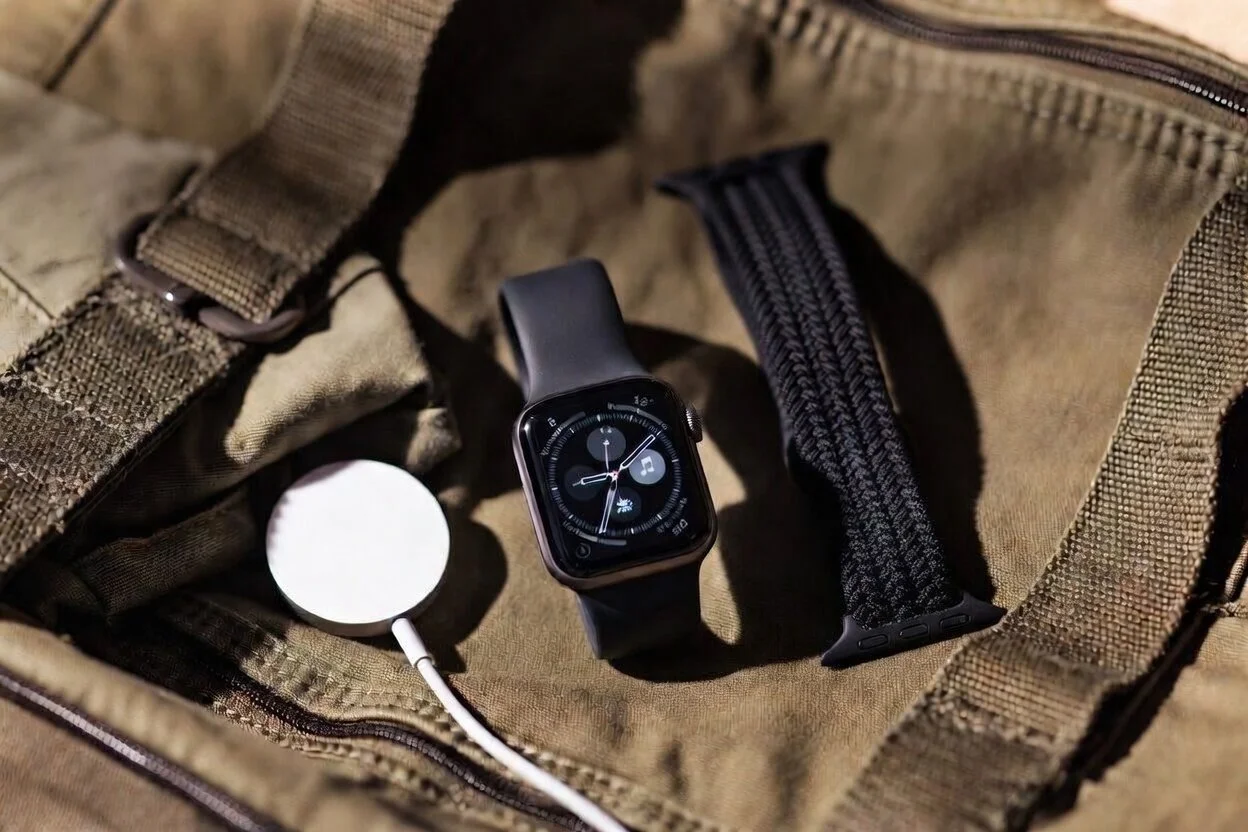
Optimizing the Apple Watch
I have owned plenty of gear that was interesting for a week and then slowly fell by the wayside.
The Apple Watch is not in that category.
Even though it is not my favorite watch, I much prefer the aesthetic of dive watches; I still find myself using it more than any of my other watches because it solves real problems every day. It lets me check what matters without pulling out my phone.
At a glance, I have it set up to show me the time, day, date, weather, current temperature, step count, and my next calendar event. It also gives me timers, alarms, activity reminders, workout tracking, tap-to-pay (Apple Pay), and quick notification triage all in one place on my wrist. When set up correctly, it reduces friction rather than creating it.
That last part matters.
Out of the box, the Apple Watch can feel like one more needy device. Too many notifications, the wrong band, and a sloppy charging routine can make it feel like a hassle. Once I simplified my setup, it started making a lot more sense.
This is the Apple Watch setup I actually recommend.
Affiliate Disclosure: As an Amazon Associate I earn from qualifying purchases. This post contains affiliate links to products I personally use and recommend. If you click a link and make a purchase, I may receive a small commission at no extra cost to you. All opinions are my own based on real-world experience, daily use, and travel.
The three things that made me like the Apple Watch more…
What improved the Apple Watch for me was not some hidden advanced feature. It was getting three basics right.
First, I was extremely reluctant to have another electronic item that required charging…until I built charging into a habit I already had.
Second, I found two affordable band options that are genuinely comfortable.
Third, I turned off the junk that drains battery and attention.
That combination made the watch much more useful and removed much of the friction.
The easiest charging fix
The simplest Apple Watch tip I have is also the most effective: keep a dedicated watch charger in your bathroom and charge the watch when you shower.
That one habit solves most of the battery problem.
Your watch will be at its lowest charge first thing in the morning (after a night of tracking your sleep), after a workout (when the watch is using GPS and actively tracking heart rate), and at the end of the day. These are also the times of day when you are most likely to be showering.
You are not wearing the watch in the shower anyway, so it is a natural time to charge. You do not need to remember a separate nighttime routine. You do not need to worry as much about waking up to a dead watch. You just top it off during part of the day when it would be off your wrist regardless.
If you do not already have a second charger, this is one of the cheapest upgrades you can make to the Apple Watch experience.
I recommend using the official Apple charger, as they use proprietary technology that charges faster than non-Apple third-party chargers:
The two cheap bands I actually like
The band that comes with the Apple Watch is ok, but Apple’s upgraded Solo Loop band is great.
Unlike the stock band, the Solo Loop is made of a single piece of stretchy liquid silicone rubber that has no clasps or buckles. This means there is no bulk under the wrist, and the stretchy loop is ultra comfortable.
The only problem is that it costs $50!
Fortunately, there are two budget alternatives that I think are just as good.
1. Arctime silicone loop
This is my go-to. The silicone loop is soft, flexible, sweat-friendly, and easy to clean. It works well for workouts, hot weather, travel, yard work, and everyday wear when you want something that disappears on the wrist.
If you only want one band, this is probably the safest choice.
What I recommend (affiliate link):
2. Braided loop
Another alternative is the braided loop. A braided loop feels lighter and more relaxed than silicone, especially if you wear your Apple Watch all day. It is breathable, low profile, and super comfortable.
The only downside is that it doesnt do as well in wet conditions and can take a little time to dry. The silicone loop is more durable, water-resistant, and easy to clean. The braided loop is better when comfort is the priority, and there are more color options available.
Settings Worth Changing
Battery life gets much better when you stop letting the watch do things you do not actually need.
I do not think the goal should be squeezing every possible minute out of the battery. The goal should be cutting the waste.
Here are the settings that matter most.
Turn off unnecessary notifications. This is the biggest quality-of-life improvement. I want calls, texts from important people, calendar alerts, timers, and a few reminders. That is it. The more the watch buzzes, the worse it gets.
Reduce screen activity. If you do not need the display constantly active, tone that down. Less screen time means less battery drain.
Audit background app activity. Most apps do not need to be constantly active on your wrist. If an app is not adding clear value, it should not be competing for battery.
Use health and workout features intentionally. These features are useful, but there is no reason to turn the watch into a sensor platform for things you never check.
In other words, the Apple Watch gets better when it does less.
If you want to go deeper, this Reddit article provides step-by-step instructions for optimizing battery life.
Why I prefer the Apple Watch to pulling out my phone
This is the real reason I keep wearing it.
The Apple Watch helps me avoid my phone.
That may sound small, but it matters. A quick glance at the wrist is clean. Pulling out the phone is rarely clean. You unlock it for one reason, then find yourself checking email, headlines, or some app you had no intention of opening.
The Apple Watch acts like a filter. It lets me see whether something matters without getting sucked into the larger device in my pocket.
That alone justifies it for me.
It is especially useful for travel
The Apple Watch is even better when I am traveling.
It provides turn-by-turn directions on my wrist. I can also pay for items, show boarding passes, get flight updates and gate changes, access public transportation, and see texts all without having to constantly dig for my phone. Airports, train stations, hotel mornings, boarding windows, and day trips all involve lots of little time and attention demands. The watch handles those well.
That is the pattern with the Apple Watch in general. It is not about one spectacular feature. It is about removing dozens of tiny bits of friction.
My recommendation
If you already own an Apple Watch, a couple of small tweaks can greatly improve your experience.
Get a second charger for the bathroom. Upgrade the watches band to a comfortable silicone or braided loop. Then spend ten minutes trimming back notifications and unnecessary activity.
That is the combination that made the biggest difference for me.
Once you get those basics right, the Apple Watch starts feeling a lot less like a gadget and a lot more like a useful piece of everyday gear.
As an Amazon Associate I earn from qualifying purchases.

A practical guide to men’s summer moccasins, including camp mocs, boat shoes, blucher mocs, driving mocs, and loafers — how to tell them apart and which one to buy first.